Search: "sqlite AND peewee"
cysqlite - a new sqlite driver

Back in the spring of 2019, I began working on cysqlite,
a from-scratch DB-API compatible SQLite driver. I intended one day to use it as
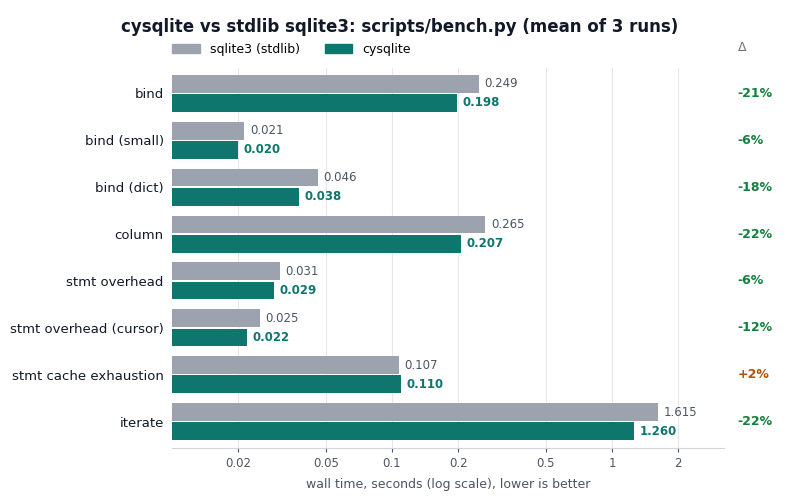
a replacement for pysqlite3. Seven years later, the project is ready. It provides an API and performance similar to the standard library sqlite3 module, with many additional features.
Multi-threaded SQLite without the OperationalErrors

SQLite's write lock and pysqlite's clunky transaction state-machine are a toxic combination for multi-threaded applications. Unless you are very diligent about keeping your write transactions as short as possible, you can easily wind up with one thread accidentally holding a write transaction open for an unnecessarily long time. Threads that are waiting to write will then have a much greater likelihood of timing out while waiting for the lock, giving the illusion of poor performance.
In this post I'd like to share a very effective technique for performing writes to a SQLite database from multiple threads.
Dear Diary, an Encrypted Command-Line Diary with Python
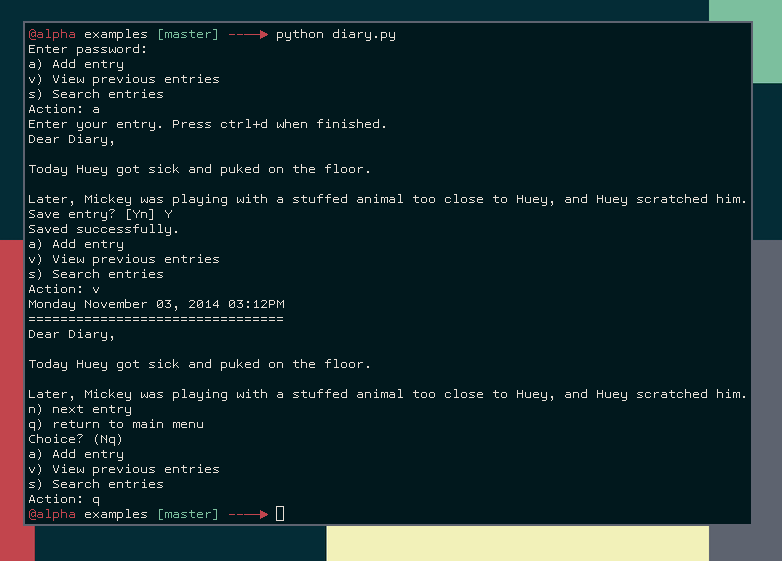
In my last post, I wrote about how to work with encrypted SQLite databases with Python. As an example application of these libraries, I showed some code fragments for a fictional diary program. Because I was thinking the examples directory of the peewee repo was looking a little thin, I decided to flesh out the diary program and include it as an example.
In this post, I'll go over the diary code in the hopes that you may find it interesting or useful. The code shows how to use the peewee SQLCipher extension. I've also implemented a simple command-line menu loop. All told, the code is less than 100 lines!
Meet Scout, a Search Server Powered by SQLite

In my continuing adventures with SQLite, I had the idea of writing a RESTful search server utilizing SQLite's full-text search extension. You might think of it as a poor man's ElasticSearch.
So what is this project? Well, the idea I had was that instead of building out separate search implementations for my various projects, I would build a single lightweight search service I could use everywhere. I really like SQLite (and have previously blogged about using SQLite's full-text search with Python), and the full-text search extension is quite good, so it didn't require much imagination to take the next leap and expose it as a web-service.
Read on for more details.
SQLite Table-Valued Functions with Python
One of the benefits of running an embedded database like SQLite is that you can configure SQLite to call into your application's code. SQLite provides APIs that allow you to create your own scalar functions, aggregate functions, collations, and even your own virtual tables. In this post I'll describe how I used the virtual table APIs to expose a nice API for creating table-valued (or, multi-value) functions in Python. The project is called sqlite-vtfunc and is hosted on GitHub. If you use Peewee, an equivalent implementation is included in the Peewee SQLite extensions.
Querying Tree Structures in SQLite using Python and the Transitive Closure Extension

I recently read a good write-up on tree structures in PostgreSQL. Hierarchical data is notoriously tricky to model in a relational database, and a variety of techniques have grown out of developers' attempts to optimize for certain types of queries.
In his post, Graeme describes several approaches to modeling trees, including:
- Adjancency models, in which each node in the tree contains a foreign key to its parent row.
- Materialized path model, in which each node stores its ancestral path in a denormalized column. Typically the path is stored as a string separated by a delimiter, e.g. "{root id}.{child id}.{grandchild id}".
- Nested sets, in which each node defines an interval that encompasses a range of child nodes.
- PostgreSQL arrays, in which the materialized path is stored in an array, and general inverted indexes are used to efficiently query the path.
In the comments, some users pointed out that the ltree extension could also be used to efficiently store and query materialized paths. LTrees support two powerful query languages (lquery and ltxtquery) for pattern-matching LTree labels and performing full-text searches on labels.
One technique that was not discussed in Graeme's post was the use of closure tables. A closure table is a many-to-many junction table storing all relationships between nodes in a tree. It is related to the adjacency model, in that each database row still stores a reference to its parent row. The closure table gets its name from the additional table, which stores each combination of ancestor/child nodes.
Querying the top N objects per group with Peewee ORM
This post is a follow-up to my post about querying the top related item by group. In this post we'll go over ways to retrieve the top N related objects by group using the Peewee ORM. I've also presented the SQL and the underlying ideas behind the queries, so you can translate them to whatever ORM / query layer you are using.
Retrieving the top N per group is a pretty common task, for example:
- Display my followers and their 10 most recent tweets.
- In each of my inboxes, list the 5 most recent unread messages.
- List the sections of the news site and the three latest stories in each.
- List the five best sales in each department.
In this post we'll discuss the following types of solutions:
- Solutions involving
COUNT() - Solutions involving
LIMIT - Window functions
- Postgresql lateral joins
Saturday morning hacks: Adding full-text search to the flask note-taking app

In preparation for the fourth and final installment in the "Flask Note-taking app" series, I found it necessary to improve the search feature of the note-taking app. In this post we will use SQLite's full-text search extension to improve the search feature.
To recap, the note-taking app provides a lightweight interface for storing markdown-formatted notes. Because I frequently find myself wanting to take notes on the spur of the moment, the note-taking app needed to be very mobile-friendly. By using twitter bootstrap and a hefty dose of JavaScript, we made an app that matches our spec and manages to look good doing it!
In part 2, we added email reminders and check-able task lists to the note-taking app. We also converted the backend to use flask-peewee's REST API extension, which made it easy to add pagination and search. And that is how I've left it for the last three months or so.
Below is a screenshot of the latest version of the notes app. The UI is much cleaner thanks to a stylesheet from bootswatch. The bootswatch stylesheet works as a drop-in replacement for the default bootstrap CSS file.
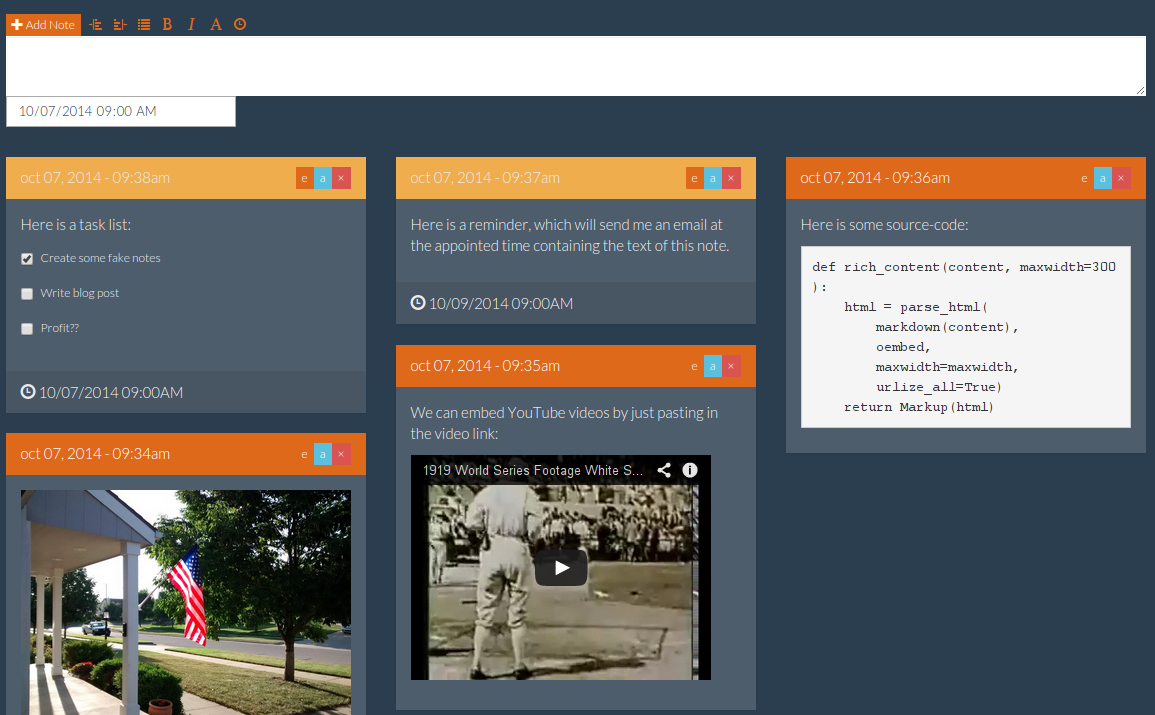
All together, the note-taking app has the following features:
- Flexible pinterest-style tiled layout that looks great on a variety of screen sizes.
- Easy to create notes and reminders from the phone.
- Notes support markdown and there is also a simple WYSIWYM markdown editing toolbar.
- Links are converted to rich media objects where possible (e.g. a YouTube URL becomes an embedded player).
- To-do lists (or task lists) can be embedded in notes.
- Email reminders can be scheduled for a given note.
- Simple full-text search.
- Pagination.
You can browse or download the finished code from part 2 in this gist. If you're in a hurry, you can find all the code from this post in this gist.
In case you were curious, I've been using the notes app for things like:
- Bookmarking interesting sites to read later.
- Creating short to-do lists or writing down particular items to get from the store, etc.
- Writing down interesting dreams or ideas I get in the middle of the night.
- Appointment reminders, reminders to call people, etc.
- Saving funny cat pics.
- Writing down ideas for programming projects.
- Saving code snippets or useful commands.
Querying the top item by group with peewee ORM
In this post I'd like to share some techniques for querying the top item by group using the Peewee ORM. For example,
- List the most recent tweet by each of my followers.
- List the highest severity open bug for each of my open source projects.
- List the latest story in each section of a news site.
This is a common task, but one that can be a little tricky to implement in a single SQL query. To add a twist, we won't use window functions or other special SQL constructs, since they aren't supported by SQLite. If you're interested in finding the top N items per group, check out this follow-up post.
Going Fast with SQLite and Python
In this post I'd like to share with you some techniques for effectively working with SQLite using Python. SQLite is a capable library, providing an in-process relational database for efficient storage of small-to-medium-sized data sets. It supports most of the common features of SQL with few exceptions. Best of all, most Python users do not need to install anything to get started working with SQLite, as the standard library in most distributions ships with the sqlite3 module.