Entries tagged with python
cysqlite - a new sqlite driver

Back in the spring of 2019, I began working on cysqlite,
a from-scratch DB-API compatible SQLite driver. I intended one day to use it as
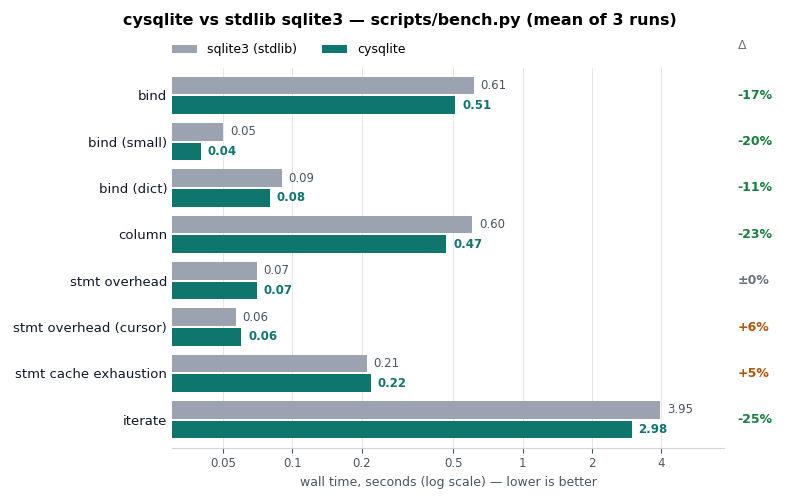
a replacement for pysqlite3. Seven years later, the project is ready. It provides an API and performance similar to the standard library sqlite3 module, with many additional features.
Ghost in the Shell: my AI Experiment

A man's at odds to know his mind cause his mind is aught he has to know it with. He can know his heart, but he dont want to. Rightly so. Best not to look in there. It aint the heart of a creature that is bound in the way that God has set for it. You can find meanness in the least of creatures, but when God made man the devil was at his elbow. A creature that can do anything. Make a machine. And a machine to make the machine. An evil that can run itself a thousand years, no need to tend it.
This isn't a post about the machines, though. It is always the human builder that comes first and last.
Asyncio Finally Got Peewee

I feel that it is high time that Peewee had an assyncio story. I've avoided this for years, but asyncio is not going anywhere. Peewee remains a synchronous ORM, but in order to work with the ever-widening sphere of async-first web frameworks and database drivers, it was time to come up with a plan.
AsyncIO

I'd like to put forth my current thinking about asyncio. I hope this will answer some of the questions I've received as to whether Peewee will one day support asyncio, but moreso I hope it will encourage some readers (especially in the web development crowd) to question whether asyncio is appropriate for their project, and if so, look into alternatives like gevent.
Caching trick for Python web applications
I'd like to share a simple trick I use to reduce roundtrips pulling data from a cache server (like Redis or Kyoto Tycoon. Both Redis and Kyoto Tycoon support efficient bulk-get operations, so it makes sense to read as many keys from the cache as we can when performing an operation that may need to access multiple cached values. This is especially true in web applications, as a typical web-page may multiple chunks of data and rendered HTML from a cache (fragment-caching) to build the final page that is sent as a response.
If we know ahead-of-time which cache-keys we need to fetch, we could just grab the cached data in one Redis/KT request and hold onto it in memory for the duration of the request.
Peewee now supports CockroachDB

I'm pleased to announce that Peewee now supports CockroachDB (CRDB), the distributed, horizontally-scalable SQL database. I'm excited about this release, because it's now quite easy to get up-and-running with a robust SQL database that can scale out with minimal effort (documentation).
Here is how you configure a CockroachDatabase instance:
from playhouse.cockroachdb import CockroachDatabase

db = CockroachDatabase('my_app', user='root', host='10.1.0.8', port=26257)
CRDB conveniently provides a very similar SQL dialect to Postgres, which has been
well-supported in Peewee for many years, allowing you to use features like jsonb
and arrays,
in addition to the regular complement of field-types. Additionally, CRDB speaks
the same wire-protocol as Postgres, so it works out-of-the-box using the
popular psycopg2 driver.
New features planned for Python 4.0
With the release of Python 3.8 coming soon, the core development team has asked me to summarize our latest discussions on the new features planned for Python 4.0, codename "ouroboros: the snake will eat itself". This will be an exciting release and a significant milestone, many thanks to the hard work of over 100 contributors.
ucache, a lightweight caching library for python

I recently wrote about Kyoto Tycoon (KT), a fast key/value database server. KT databases may be ordered (B-Tree / red-black tree) or unordered (hash table), and persistent or stored completely in-memory. Among other things, I'm using KT's hash database as a cache for things like HTML fragments, RSS feed data, etc. KT supports automatic, time-based expiration, so using it as a cache is a natural fit.
Besides using KT as a cache, in the past I have also used Redis and Sqlite. So I've released a small library I'm calling ucache which can be used with these storage backends and has a couple nice features. I will likely flesh it out and add support for additional storages as I find time to work on it.
Multi-process task queue using Redis Streams
In this post I'll present a short code snippet demonstrating how to use Redis streams to implement a multi-process task queue with Python. Task queues are commonly-used in web-based applications, as they allow decoupling time-consuming computation from the request/response cycle. For example when someone submits the "contact me" form, the webapp puts a message onto a task queue, so that the relatively time-consuming process of checking for spam and sending an email occurs outside the web request in a separate worker process.
queue = TaskQueue('my-queue')

@queue.task
def fib(n):
    a, b = 0, 1
    for _ in range(n):
        a, b = b, a + b
    return b

# Calculate 100,000th fibonacci number in worker process.
fib100k = fib(100000)

# Block until the result becomes ready, then display last 6 digits.
print('100,000th fibonacci ends with: %s' % str(fib100k())[-6:])
When using Redis as a message broker, I've always favored using LPUSH/BRPOP (left-push, blocking right-pop) to enqueue and dequeue a message. Pushing items onto a list ensures that messages will not be lost if the queue is growing faster than it can be processed – messages just get added until the consumer(s) catch up. Blocking right-pop is an atomic operation, so Redis also guarantees that no matter how many consumers you've got listening for messages, each message is delivered to only one consumer.
There are some downsides to using lists, primarily the fact that blocking right-pop is a destructive read. Once a message is read, the application can no longer tell whether the message was processed successfully or has failed and needs to be retried. Similarly, there is no visibility into which consumer processed a given message.
Redis 5.0 includes a new streams data-type for modelling append-only, persistent message logging. Streams are identified by a key, like other data-types, and support append, read and delete operations. Streams provide a number of benefits over other data-types typically used for building distributed task queues using Redis, particularly when used with consumer groups.
- Streams support fan-out message delivery to all interested readers (kinda like pub/sub), or you can use consumer groups to ensure that messages are distributed evenly among a pool of consumers (like lpush/brpop).
- Messages are persistent and history is kept around, even after a message has been read by a consumer.
- Message delivery information is tracked by Redis, making it easy to identify which tasks were completed successfully, and which failed and need to be retried (at the cost of an explicit ACK).
- Messages are structured as any number of arbitrary key/value pairs, providing a bit more internal structure than an opaque blob stored in a list.
Consumer groups provide us with a unified interface for managing message delivery and querying the status of the task queue. These features make Redis a nice option if you need a message broker.
Introduction to Redis streams with Python

Redis 5.0 contains, among lots of fixes and improvements, a new data-type and set of commands for working with persistent, append-only streams.
Redis streams are a complex topic, so I won't be covering all aspects of the APIs, but hopefully after reading this post you'll have a feel for how they work and whether they might be useful in your own projects.
Streams share some superficial similarities with list operations and pub/sub, with some important differences. For instance, task queues are commonly implemented by having multiple workers issue blocking-pop operations on a list. The benefit of this approach is that messages are distributed evenly among the available workers. Downsides, however, are:
- Once a message is read it's effectively "gone forever". If the worker crashes there's no way to tell if the message was processed or needs to be rescheduled. This pushes the responsibility of retrying failed operations onto the consumer.
- Only one client can read a given message. There's no "fan-out".
- No visibility into message state after the message is read.
Similarly, Redis pub/sub can be used to publish a stream of messages to any number of interested consumers. Pub/sub is limited by the fact that it is "fire and forget". There is no history, nor is there any indication that a message has been read.
Streams allow the implementation of more robust message processing workflows, thanks to the following features:
- streams allow messages to be fanned-out to multiple consumers or you can use stateful consumers ("consumer groups") to coordinate message processing among multiple workers.
- message history is preserved and visible to other clients.
- consumer groups support message acknowledgements, claiming stale unacknowledged messages, and introspecting pending messages, ensuring that messages are not lost in the event of an application crash.
- streams support blocking read operations.
The rest of the post will show some examples of working with streams using the walrus Redis library. If you prefer to just read the code, this post is also available as an ipython notebook.