Search: "peewee AND sqlite"
SQLite: Small. Fast. Reliable. Choose any three.

SQLite is a fantastic database and in this post I'd like to explain why I think that, for many scenarios, SQLite is actually a great choice. I hope to also clear up some common misconceptions about SQLite.
Migrating to SQLite
Small. Fast. Reliable. Choose any three.
I made the decision this week to migrate my personal sites and several other sites I host onto SQLite. Previously almost everything I hosted had been using Postgresql. The move was motivated by a couple factors:
- SQLite is awesome!
- Self-contained: does not require a separate server process
- Data is stored in a single file, simplifying backups
- Excellent Python (and peewee) support
- Full-text search
At times it has seemed to me that there is a tacit agreement within the Flask / Django communities that if you're using SQL you should be using Postgresql. Postgresql is an amazing piece of engineering. I have spent the last five years of my career working exclusively with it, and I am continually impressed by its performance and the constant stream of great new features.
So why change things?
Well, as my list indicates, there are a handful of reasons. But the primary reason was that I wanted something lightweight. I'm running a fairly low-traffic, read-heavy site, so Postgresql was definitely overkill. My blog is deployed on a VPS with very limited resources, so every MB of RAM counts. Additionally, I wasn't using any special Postgresql features so there was nothing holding me back.
(continued...)
Peewee, a lightweight Python ORM - Original Post
For the past month or so I've been working on writing my own ORM in Python. The project grew out of a need for a lightweight persistence layer for use in Flask web apps. As I've grown so familiar with the Django ORM over the past year, many of the ideas in Peewee are analagous to the concepts in Django. My goal from the beginning has been to keep the implementation simple without sacrificing functionality, and to ultimately create something hackable that others might be able to read and contribute to.
Using SQLite Full-Text Search with Python

In this post I will show how to use SQLite full-text search with Python (and a lot of help from peewee ORM). We will see how to index content for searching, and how to order search results using two ranking algorithms.
Last week I migrated my site from Postgresql to SQLite. I had been using Redis to power my site's search, but since SQLite has an awesome full-text search extension, I decided to give it a try. I am really pleased with the results, and being able to specify boolean search queries is an added plus. Here is a brief overview of the types of search queries SQLite supports:
- Simple phrase: peewee would return all docs containing the word peewee.
- Prefix queries: py* would return docs containing Python, pypi, etc.
- Quoted phrases: "sqlite extension"
NEAR: peewee NEAR sqlite would return docs containing the words peewee and sqlite with no more than10intervening words. You can also specify the max number of intervening words, e.g. peewee NEAR/3 sqlite.AND,OR,NOT: sqlite OR postgresql AND NOT mysql would return docs about high-quality databases (just trollin).
Check out the full post for details on adding full-text search to your project.
Encrypted SQLite Databases with Python and SQLCipher
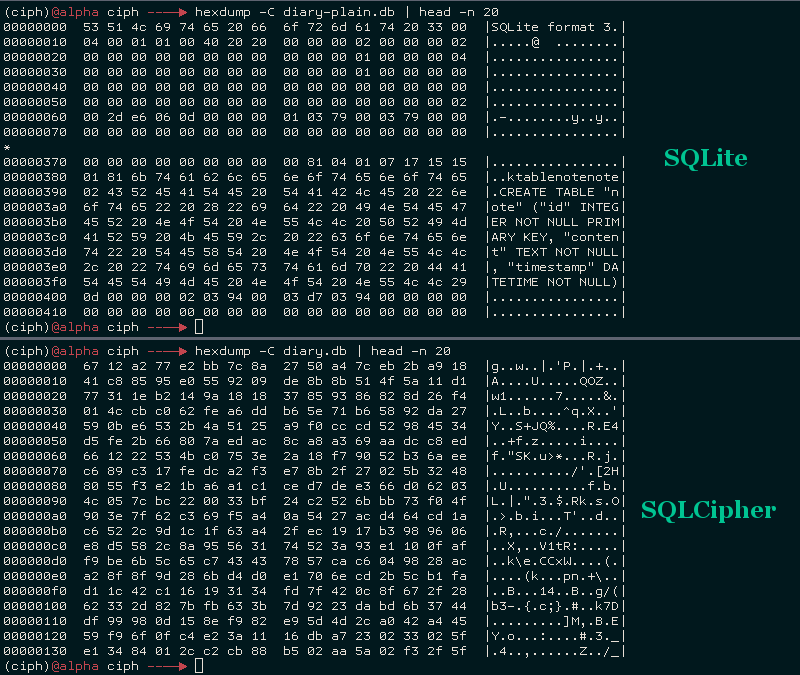
SQLCipher, created by Zetetic, is an open-source library that provides transparent 256-bit AES encryption for your SQLite databases. SQLCipher is used by a large number of organizations, including Nasa, SalesForce, Xerox and more. The project is open-source and BSD licensed, and there are open-source python bindings.
A GitHub user known as The Dod was kind enough to contribute a sqlcipher playhouse module, making it a snap to use Peewee with SQLCipher.
In this post, I'll show how to compile SQLCipher and the sqlcipher3 python bindings, then use peewee ORM to work with an encrypted SQLite database.
Extending SQLite with Python

SQLite is an embedded database, which means that instead of running as a separate server process, the actual database engine resides within the application. This makes it possible for the database to call directly into the application when it would be beneficial to add some low-level, application-specific functionality. SQLite provides numerous hooks for inserting user code and callbacks, and, through virtual tables, it is even possible to construct a completely user-defined table. By extending the SQL language with Python, it is often possible to express things more elegantly than if we were to perform calculations after the fact.
In this post I'll describe how to extend SQLite with Python, adding functions and aggregates that will be callable directly from any SQL queries you execute. We'll wrap up by looking at SQLite's virtual table mechanism and seeing how to expose a SQL interface over external data sources.
Five reasons you should use SQLite in 2016
If you haven't heard, SQLite is an amazing database capable of doing real work in real production environments. In this post, I'll outline 5 reasons why I think you should use SQLite in 2016.
Using the SQLite JSON1 and FTS5 Extensions with Python
Back in September, word started getting around trendy programming circles about a new file that had appeared in the SQLite fossil repo named json1.c. I originally wrote up a post that contained some gross hacks in order to get pysqlite to compile and work with the new json1 extension. With the release of SQLite 3.9.0, those hacks are no longer necessary.
SQLite 3.9.0 is a fantastic release. In addition to the much anticipated json1 extension, there is a new version of the full-text search extension called fts5. fts5 improves performance of complex search queries and provides an out-of-the-box BM25 ranking implementation. You can also boost the significance of particular fields in the ranking. I suggest you check out the release notes for the full list of enhancements
This post will describe how to compile SQLite with support for json1 and fts5. We'll use the new SQLite library to compile a python driver so we can use the new features from python. Because I really like pysqlite and apsw, I've included instructions for building both of them. Finally, we'll use peewee ORM to run queries using the json1 and fts5 extensions.
Web-based SQLite Database Browser, powered by Flask and Peewee

For the past week or two I've been spending some of my spare time working on a web-based SQLite database browser. I thought this would be a useful project, because I've switched all my personal projects over to SQLite and foresee using it for pretty much everything. It also dovetailed with some work I'd been doing lately on peewee regarding reflection and code generation. So it seemed like some pretty good bang/buck, especially given my perception that there weren't many SQLite browsers out there (it turns out there are quite a few, however). I'm sharing it in the hopes that other devs (and non-devs?) find it useful.
LSM Key/Value Storage in SQLite3

Several months ago I was delighted to see a new extension appear in the SQLite source tree. The lsm1 extension is based on the LSM key/value database developed as an experimental storage engine for the now-defunct SQLite4 project. Since development has stopped on SQLite4 for the forseeable future, I was happy to see this technology being folded into SQLite3 and was curious to see what the SQLite developers had in mind for this library.
The SQLite4 LSM captured my interest several years ago as it seemed like a viable alternative to some of the other embedded key/value databases floating around (LevelDB, BerkeleyDB, etc), and I went so far as to write a set of Python bindings for the library. As a storage engine, it seems to offer stable performance, with fast reads of key ranges and fast-ish writes, though random reads may be slower than the usual SQLite3 btree. Like SQLite3, the LSM database supports a single-writer/multiple-reader transactional concurrency model, as well as nested transaction support.
The LSM implementation in SQLite3 is essentially the same as that in SQLite4, plus some additional bugfixes and performance improvements. Crucially, the SQLite3 implementation comes with a standalone extension that exposes the storage engine as a virtual table. The rest of this post will deal with the virtual table, its implementation, and how to use it.