Building a bookmarking service with python and phantomjs
Using python and phantomjs, a headless webkit browser, it is a snap to build a self-hosted bookmarking service that can capture images of entire pages. Combine this with a simple javascript bookmarklet and you end up with a really convenient way of storing bookmarks. The purpose of this post will be to walk through the steps to getting a simple bookmarking service up and running.
Installing phantomjs
First step is installing phantomjs and making sure it is working correctly. Depending on your system you may need to follow slightly different instructions to get things running, so refer to phantomjs's documentation if you run into issues.
Select the appropriate binary depending on your system architecture:
- x86: http://phantomjs.googlecode.com/files/phantomjs-1.5.0-linux-x86-dynamic.tar.gz
- x86_64: http://phantomjs.googlecode.com/files/phantomjs-1.5.0-linux-x86_64-dynamic.tar.gz
Grab the tarball and extract it somewhere:
mkdir ~/bin/
cd ~/bin/
wget http://phantomjs.googlecode.com/files/phantomjs-1.5.0-linux-x86-dynamic.tar.gz
tar xzf phantomjs-1.5.0-linux-x86-dynamic.tar.gz
Symlink the binary somewhere onto your path
sudo ln -s ~/bin/phantomjs/bin/phantomjs /usr/local/bin/phantomjs
Install dependencies -- fontconfig and freetype
sudo pacman -S fontconfig freetype2
Test phantomjs in a terminal. You should see something like the following:
[charles@foo] $ phantomjs
phantomjs>
Setting up the python environment
I really like using the flask microframework for projects like this -- the entire app will be contained within a single python module. For simplicity I also like to use peewee and sqlite for persistence. I've written some bindings for flask and peewee which contain the necessary dependencies, so that is all we'll need to install.
Set up a new virtualenv
virtualenv --no-site-packages bookmarks
cd bookmarks
source bin/activate
Install the package (and its dependencies)
pip install flask-peewee
Create a couple directories and empty files to hold our app, screenshots, and templates:
bookmarks/ ----- *this is the root of our virtualenv
bookmarks/app/
bookmarks/app/app.py
bookmarks/app/templates/
bookmarks/app/templates/index.html
Grab a copy of bootstrap for our static media:
cd app/
wget http://twitter.github.com/bootstrap/assets/bootstrap.zip
unzip bootstrap.zip
mv bootstrap/ static/
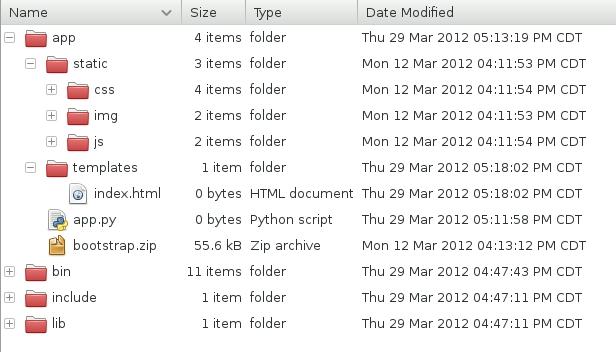
When you're all done you should have a virtualenv that looks something like this:
Writing some code
The python app will be fairly straightforward I hope. It consists of two views, one of which passes a list of bookmarks to a template for rendering, the other is responsible for adding new bookmarks.
All together it looks like this:
import datetime
import hashlib
import os
import subprocess

from flask import Flask, abort, redirect, render_template, request
from flask_peewee.db import Database
from flask_peewee.utils import object_list
from peewee import *

# app configuration
APP_ROOT = os.path.dirname(os.path.realpath(__file__))
MEDIA_ROOT = os.path.join(APP_ROOT, 'static')
MEDIA_URL = '/static/'
DATABASE = {
    'name': os.path.join(APP_ROOT, 'bookmarks.db'),
    'engine': 'peewee.SqliteDatabase',
}
PASSWORD = 'shh'
PHANTOM = '/usr/local/bin/phantomjs'
SCRIPT = os.path.join(APP_ROOT, 'screenshot.js')

# create our flask app and a database wrapper
app = Flask(__name__)
app.config.from_object(__name__)
db = Database(app)

class Bookmark(db.Model):
    url = CharField()
    created_date = DateTimeField(default=datetime.datetime.now)
    image = CharField(default='')

    class Meta:
        ordering = (('created_date', 'desc'),)

    def fetch_image(self):
        url_hash = hashlib.md5(self.url).hexdigest()
        filename = 'bookmark-%s.png' % url_hash

        outfile = os.path.join(MEDIA_ROOT, filename)
        params = [PHANTOM, SCRIPT, self.url, outfile]

        exitcode = subprocess.call(params)
        if exitcode == 0:
            self.image = os.path.join(MEDIA_URL, filename)

@app.route('/')
def index():
    return object_list('index.html', Bookmark.select())

@app.route('/add/')
def add():
    password = request.args.get('password')
    if password != PASSWORD:
        abort(404)

    url = request.args.get('url')
    if url:
        bookmark = Bookmark(url=url)
        bookmark.fetch_image()
        bookmark.save()
        return redirect(url)
    abort(404)

if __name__ == '__main__':
    # create the bookmark table if it does not exist
    Bookmark.create_table(True)

    # run the application
    app.run()
Adding the index template
The index template is rendered by the index view and displays a pretty list of bookmarks. Bootstrap comes with some nice css selectors for displaying lists of images which we will make use of. The pagination is provided by the flask-peewee "object_list" helper:
<!doctype html>
<html>
<head>
  <title>Bookmarks</title>
  <link rel=stylesheet type=text/css href="{{ url_for('static', filename='css/bootstrap.min.css') }}" />
</head>
<body>
  <div class="container">
    <div class="row">
      <div class="page-header">
        <h1>Bookmarks</h1>
      </div>
      <ul class="thumbnails">
        {% for bookmark in object_list %}
          <li class="span6">
            <div class="thumbnail">
              <a href="{{ bookmark.url }}" title="{{ bookmark.url }}">
                <img style="width:450px;" src="{{ bookmark.image }}" />
              </a>
              <p><a href="{{ bookmark.url }}">{{ bookmark.url|urlize(25) }}</a></p>
              <p>{{ bookmark.created_date.strftime("%m/%d/%Y %H:%M") }}</p>
            </div>
          </li>
        {% endfor %}
      </ul>

      <div class="pagination">
        {% if page > 1 %}<a href="./?page={{ page - 1 }}">Previous</a>{% endif %}
        {% if pagination.get_pages() > page %}<a href="./?page={{ page + 1 }}">Next</a>{% endif %}
      </div>
    </div>
  </div>
</body>
</html>
Screenshot script
The final piece of magic is the actual script that renders the screenshots. It should live in the root of your application alongside "app.py" and be named "screenshot.js". The width, height and clip_height are all hardcoded, but could very easily be configured by your script and passed in on the command line:
var page = new WebPage(),
    address, outfile, width, height, clip_height;

address = phantom.args[0];
outfile = phantom.args[1];
width = 1024;
clip_height = height = 800;

page.viewportSize = { width: width, height: height };
page.clipRect = { width: width, height: clip_height };

page.open(address, function (status) {
  if (status !== 'success') {
    phantom.exit(1);
  } else {
    page.render(outfile);
    phantom.exit();
  }
});
Testing things out
To test out the bookmarking script start up the application:
$ python app.py
* Running on http://127.0.0.1:5000/
You should be able to navigate to that URL and see a very simple page with no bookmarks. Let's fix that by adding 2 new bookmarks by browsing to the following urls:
- http://127.0.0.1:5000/add/?url=http://charlesleifer.com.com/&password=shh
- http://127.0.0.1:5000/add/?url=https://www.github.com/&password=shh
If all goes well you should see a momentary pause while phantomjs grabs the screenshots, then a subsequent redirect to requested urls. The redirect is there because in a moment we will be adding a "bookmarklet" -- thus, when browsing and something interesting comes up, you can bookmark it and then be redirected back to the page you were browsing.
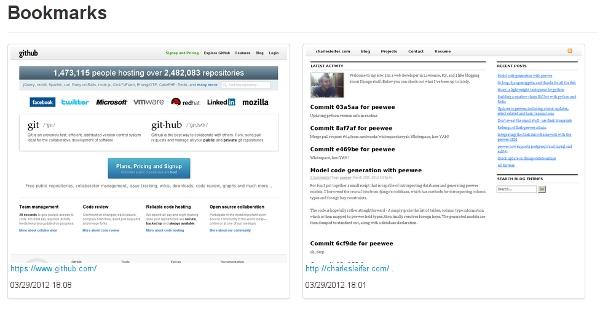
Returning to your application, it should look something like this:
Adding the javascript bookmarklet
Open up your web browser's bookmarks manager and create a new bookmark called "Bookmark Service". Instead of pointing it at a specific URL, we'll use a bit of javascript that will send the current page off to our bookmarking service:
javascript:location.href='http://127.0.0.1:5000/add/?password=shh&url='+location.href;
Try navigating to another page then clicking the bookmarklet.
Improving the bookmark service
There are a lot of ways you can improve this! Here is a short list of some ideas:
- support multiple clipping heights in case you want to get the full page
- generate images in a task queue
- add some "real" security
- add buttons and a view to delete bookmarks
- capture the title of the page and store that in the database as well (hint: use the bookmarklet)
- try using ghost or a pyqt browser instead of phantomjs
Thanks for reading, I hope you enjoyed this post! Feel free to submit any comments or suggestions.
If you're interested in more projects like this, check out the saturday-morning hack posts.
Comments (1)

Commenting has been closed.
John Knight | apr 06 2012, at 03:25am
Give us more Python tutorial like this. It's awesome man. :) Keep up the good work.