cysqlite - a new sqlite driver

Back in the spring of 2019, I began working on cysqlite, a from-scratch DB-API compatible SQLite driver. I intended one day to use it as a replacement for pysqlite3. I began experimenting with the library and eventually got it to a point where it was working fairly well, but it needed a lot more time, effort and polish before I would think of using it. Life got busy, we were blessed with two more children, and the project stayed dormant for quite a while.

In the meantime, I was using pysqlite3 extensively in my own projects, as it allows me the flexibility to compile against a particular version of SQLite without depending on whatever version the system happens to have. Many SQLite features are exposed as compile-time options, so having this flexibility is fairly important if you use SQLite in anger (which is the one true way, really).
I had been trying my best to keep pysqlite3 in sync with changes that were
happening upstream in CPython. At the time I released pysqlite3, it had a
handful of features that weren't available in the standard library sqlite3:
window functions, sqlite3_open_v2 flags, VFS support, slightly different
semantics around DB-API commit behaviors. Over time those differences have
largely disappeared and the stdlib sqlite3 has continued to add new
features. Internally the CPython team has also begun using private APIs
everywhere along with the argument clinic preprocessor. All this makes it much
more difficult to keep the standalone pysqlite3 code up-to-date.
At the beginning of this year I became willing (enough) to learn how to put
together a build pipeline to get self-contained, cross-platform binary wheels
building for pysqlite3. Really, all it took was the YAML equivalent of piping
some random shit from the internet into | sh, but I digress. At this point I
ran into a new conundrum. Peewee ORM contained
a very hacky C extension that allowed me to grab the sqlite3* pointer off
stdlib or pysqlite3 Connection object. With the sqlite3 handle, it was then
possible to expose additional C-level functionality in Peewee - stuff like
user-defined virtual tables, richer callbacks, etc. I went off the deep end a
little experimenting with this, and somehow it all got jammed into this one
sqlite extension module. The problem was that it doesn't work with a
self-contained pysqlite3. The C extension necessarily links against the
system libsqlite3, while the sqlite3* pointer I was grabbing lived in the
self-contained pysqlite3 world. This would blow a few feet off for sure.

Complements Raising Arizona, 1987. My parents told me that when I was very little I was fascinated by this scene, because the foot was still inside the boot.
In my hometown there was a guy who was the subject of a series of newspaper articles when it was discovered that he was keeping his own amputated foot in a jar of some kind of brine on his front porch. He had snipped off a couple of the toes to give to friends, but the foot was just kept in a bucket (in summer, in Kansas). At one point the police seized the foot, but a few weeks later it was reported that the amputee was reunited with his foot.
At the end of these perambulations (ahem), I decided that pysqlite3 was looking like a bit of a dead end. People that really want to use everything SQLite are probably already using apsw. And people that want the maximum compatibility and minimum pain are going to use whatever the stdlib provides. pysqlite3 had fallen behind the stdlib, and without a clear path forward, I decided to reinvigorate the cysqlite project. It would allow me to have a DB-API compatible sqlite driver with all the additions I wanted, and be usable by Peewee without resorting to fragile hacks.
Why should anyone care
Well, you probably shouldn't, since I think most people will fall into either of the categories I mentioned earlier - full SQLite with apsw, or maximum simplicity with the standard library. For those who are curious, though, I have never really liked using apsw. It is different enough from the DB-API that I find it cumbersome to work with. In places it's insistence on sticking close to the C API feels clunky. For the stdlib sqlite3, I dislike the way transactions are handled. I think this may be due to a particular reading of this DB-API line item, but just look at this mess:
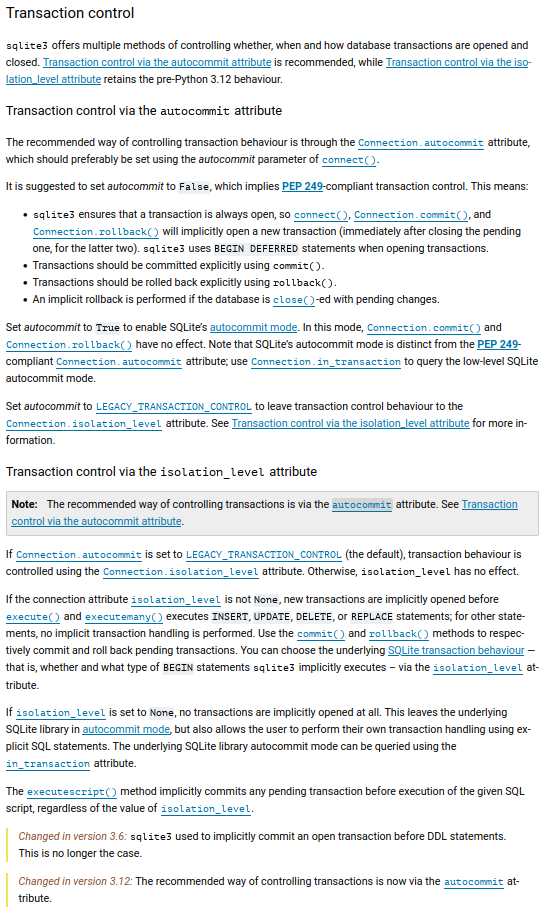
The thing I find most terrifying in that image is the
LEGACY_ prefix. That should strike fear into the heart of anyone
trying to support multiple versions of Python, because it will surely be
deprecated and removed soon.
Consider that until 3.12 we had a very easy way to tell sqlite3 to leave
transaction handling alone:
# Specifying isolation_level=None tells sqlite3 to keep out of transaction
# management, and is the easiest path to a sane world.
>>> db = sqlite3.connect(':memory:', isolation_level=None)

# Wait, what's this? Legacy??
>>> db.autocommit == sqlite3.LEGACY_TRANSACTION_CONTROL
True

# Whatever, at least we are in autocommit mode.
>>> db.in_transaction
False

# Run a transaction.
>>> db.execute('begin')
>>> db.in_transaction
True

>>> db.commit()  # Let's get out of this transaction.
>>> db.in_transaction
False
Now this is considered legacy, and based on how CPython moves fast and breaks things, I would expect it will stop working in the next year or two. Instead of the reliable method above, CPython has given us a new, completely separate alternative:
# Let's do it the way modern python wants us to.
>>> db = sqlite3.connect(':memory:', autocommit=True)

# Isolation level returns an empty string. Empty. It means whatever you
# want it to mean.
>>> db.isolation_level
''

>>> db.in_transaction
False

# So far so good.
>>> db.execute('begin')
>>> db.in_transaction
True

# Check this out:
>>> db.commit()
>>> db.in_transaction
True  # what the fuck?!

>>> db.execute('commit -- who thought this was a good idea?!')
>>> db.in_transaction
False
If you didn't catch what happened there, when we set autocommit=True, Python
silently turns commit() into a no-op for some inexplicable reason. But wait,
what happens in the old isolation_level method if we explicitly execute 'commit'?
>>> db = sqlite3.connect(':memory:', isolation_level=None)
>>> db.execute('begin')
>>> db.in_transaction
True
>>> db.execute('commit')
>>> db.in_transaction
False
So the legacy method just works, you can call the commit() method or
explicitly execute a COMMIT query, while the improved method is doing all
kinds of weird stuff. When you run sqlite3 with autocommit=False, as the docs
recommend, then your transaction begins immediately
and lasts until you commit, when a new transaction begins. This approach, and
the old implicit transactions, are terrible for SQLite. SQLite only allows one
write lock at a time, and the programmer must ensure their write transactions
are kept as short as possible when concurrency is possible. Once a write occurs
in a transaction, that transaction retains the upgraded lock until it commits
or rolls back. The end result is that it is very easy to accidentally hold an
exclusive lock when you have no need for it any longer.
OperationalError: database is locked
At the time of writing, we have two completely separate worlds for managing
transactions depending on which minor release of Python we're using. And
when you use the new autocommit mode, the commit() and rollback() methods
not only do nothing, but don't warn you that they do nothing! If you call commit() and then close your connection or python garbage collects it all changes are silently lost.
As a result, the standard library ends up with pull-requests like this.
Ecce cysqlite
cysqlite aims to address these shortcomings in the transaction handling behavior of the stdlib sqlite3. That's item number one:
- No implicit transactions or implicit commits (note that stdlib's check sucks and fails when the query uses a common table expression, among other interesting failure modes).
- No fiddling with isolation level, sentinel values or
LEGACY_constants. - No autocommit attributes.
- No methods that sometimes work sometimes don't.
- No unnecessarily long-lived transactions which hold an exclusive lock.
This is accomplished very easily. cysqlite just runs according to the same
behavior that SQLite uses by default. Unless you explicitly begin a
transaction, every statement runs in its own transaction (autocommit). There
are shortcut methods for begin(), commit() and rollback(), or you can
call .execute() and handle transactions that way.
>>> import cysqlite
>>> db = cysqlite.connect(':memory:')
>>> db.in_transaction
False

>>> db.begin()  # or db.execute('begin')
>>> db.in_transaction
True

>>> db.commit()  # or db.execute('commit')
>>> db.in_transaction
False
To make managing things easier, there is also a Peewee-style atomic()
context-manager/decorator that will wrap a block of statements in a transaction
or savepoint, and handle all the book-keeping for you, e.g.
# We can wrap blocks in the `atomic()` context manager, which will correctly
# use a transaction or savepoint depending on depth of nesting.
with db.atomic() as txn:
    db.execute('insert into ...')
    with db.atomic() as sp:
        db.execute('update ...')
I also wanted to get rid of some of the magical adapters/converters stuff, which if you haven't seen it before is pretty wild - check these out. cysqlite handles the native SQLite datatypes in the usual way:
| Python Type | SQLite Type |
|---|---|
| None | NULL |
| int, bool | INTEGER |
| float | REAL |
| str | TEXT |
| bytes, buffers | BLOB |
It applies the following rules to other Python objects:
| Python Type | SQLite Type |
|---|---|
| datetime | TEXT (isoformat with ‘ ‘ delimiter). |
| date | TEXT (isoformat) |
| Fraction, Decimal, __float__() | REAL |
| UUID | TEXT |
| Anything else | Custom via register_adapter() |
Here's a more complete example:
values = [
    None,
    1,
    2.3,
    'a text \u2012 string',
    b'\x00\xff\x00\xff',
    bytearray(b'this is a buffer'),
    datetime(2026, 1, 2, 3, 4, 5).astimezone(timezone.utc),
    datetime(2026, 2, 3, 4, 5, 6),
    date(2026, 3, 4),
    uuid.uuid4(),  # str()
]

for value in values:
    row = db.execute_one('select typeof(?), ?', (value, value))
    print(row)

# ('null',    None)
# ('integer', 1)
# ('real',    2.3)
# ('text',    'a text ‒ string')
# ('blob',    b'\x00\xff\x00\xff')
# ('blob',    b'this is a buffer')
# ('text',    '2026-01-02 03:04:05+00:00')
# ('text',    '2026-02-03 04:05:06')
# ('text',    '2026-03-04')
# ('text',    '0c4ca10a-56ab-470a-9357-d28366d97ceb')
The idea is to have sane defaults and leave it up to the programmer to convert any data they wish to handle in a special way. cysqlite supports connection-scoped adapters for Python data-types documented here, and converters for SQLite column-data coming back into Python, documented here.
Besides transactions and data-type handling, I also wanted cysqlite to provide a stable base for the extensions I had been building in peewee. As I've been working on cysqlite, I've also been winnowing-down the junk from peewee's SQLite C extension. The most unique feature is the user-defined virtual table implementation, which I've improved and moved into cysqlite. There are also C implementations of the BM25 result ranking algorithm and a few other user-defined functions which are helpful for search applications, along with support for SQLite callbacks and special functionality:
- Commit and rollback hooks
- Update hook
- Authorizer hook for fine-grained permissions
- Trace hook
- Progress hook (allows interrupting long-running operations)
- Backup APIs
- Blob I/O
cysqlite also provides DB-API compatibility along with a number of convenience methods for common tasks, such as fetching a single row or a single scalar value from a query:
Connection.execute(sql, params)- execute a query and return a cursor for the result-set.Connection.executemany(sql, seq_of_params)- execute a query repeatedly for each set of parameters in seq_of_params.Connection.executescript(sql)- execute a block of SQL statements.Connection.execute_one(sql, params)- execute a query and return a single result row (if one exists).Connection.execute_scalar(sql, params)- execute a query and return a single scalar value (if one exists).Connection.pragma(key, value=optional)- get or set the value of a SQLite run-time configurable setting.Cursor.execute(sql, params)Cursor.executemany(sql, seq_of_params)Cursor.executescript(sql)Cursor.scalar()- fetches a single scalar value from the result-set.
cysqlite also provides rich introspection helpers:
Connection.get_tables()Connection.get_views()Connection.get_indexes(table)Connection.get_columns(table)Connection.get_primary_keys(table)Connection.get_foreign_keys(table)
Lastly, and perhaps most importantly, it is trivial to build cysqlite with a statically-linked SQLite or SQLCipher. The documentation contains instructions and helpers for creating your own custom build.
In time I hope to continue adding functionality where gaps appear, or where existing APIs could be cleaner. For now I feel the implementation has become complete and stable enough to warrant writing about it, at any rate. I've added support for cysqlite in Peewee, and the full test-suite (including all SQLite-specific features) is passing when using cysqlite. I'm also using cysqlite for this site and a couple others.
Performance is generally better than the standard library. When iterating result sets cysqlite is ~25% faster:
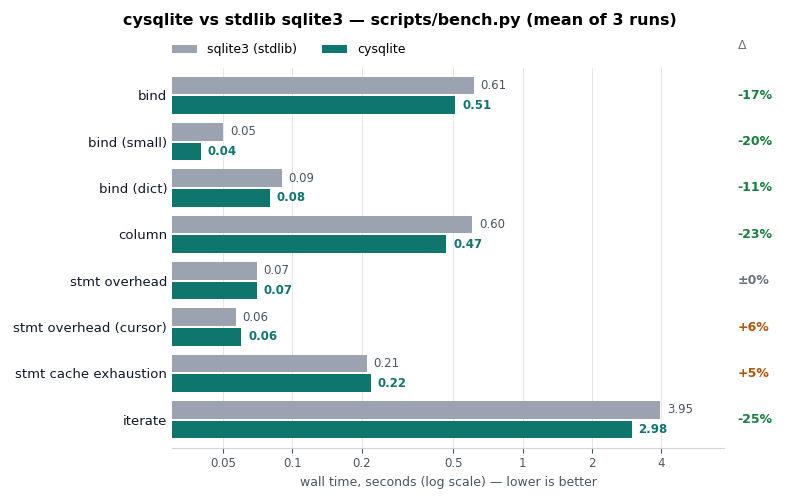
If you're interested in the project, I encourage you to check out the documentation or view the code. Peewee users can also try out the cysqlite integration.
Comments (2)


Beto Dealmeida | feb 11 2026, at 07:58am
This is really interesting, I'm definitely going to give it a try. Are there any docs on virtual tables? I couldn't find anything on the site.
Commenting has been closed.
Charles | feb 17 2026, at 10:12pm
Yes, they are here: TableFunction